
Skip to content
OTAscribe

OTAscribe

Advanced AI speech-to-text transcription: high recognition accuracy, speaker diarization and automatic meeting minutes.

ASRTranscriptionAIEnterprise

Overview

OTAscribe is an advanced AI-powered speech-to-text transcription system. It delivers high recognition accuracy and supports many languages and dialects.

Intelligent meeting processing

Are important decisions lost in the flow of discussion? Hours spent transcribing recordings and preparing minutes, while action items go unrecorded? OTAscribe is your intelligent assistant that takes over all the routine of meeting processing.

It doesn't just convert audio to text with high accuracy — it automatically produces structured reports, highlights key decisions and builds a task list. Free up time for strategic work while OTAscribe ensures full transparency and control over agreements.
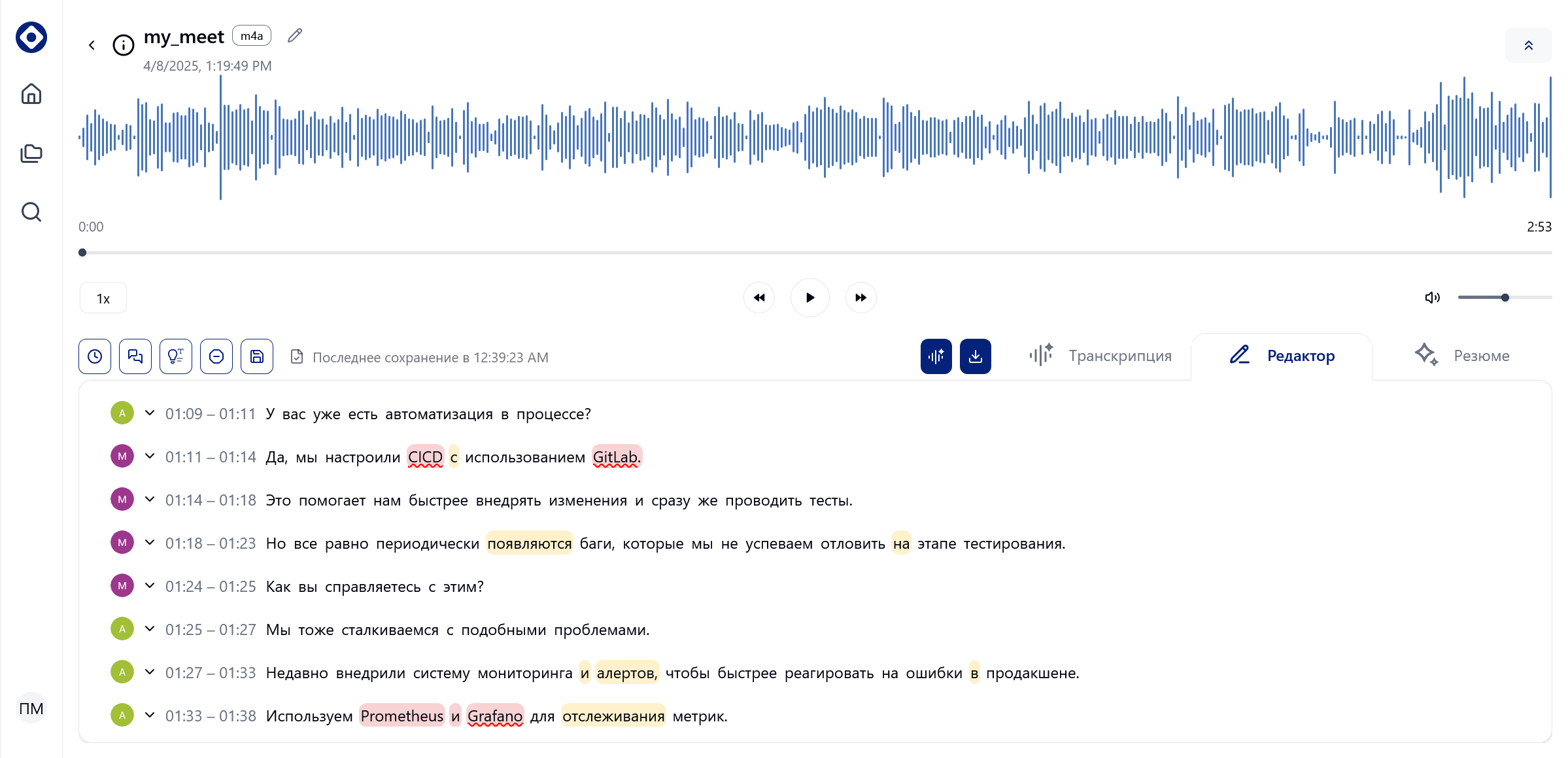
OTAscribe — meeting processing
OTAscribe interface
OTAscribe desktop interface

Key metrics

97.5%
Word Recognition Rate in ideal conditions
3–4×
Faster meeting minutes
100%
Data stays within your perimeter
4+
Export formats: PDF, DOCX, SRT, JSON…

Capabilities

Speech-to-text conversion
The recognition algorithm reaches a Word Recognition Rate of up to 97.5% in ideal conditions — accurate transcripts with no significant corrections needed.
Convenient file processing
Play, trim and edit audio right in the app: choose recording hardware, control volume, speed and seeking for a faster, simpler workflow.
Speaker annotation
Diarization automatically recognizes who spoke at each moment, while timestamps let you quickly locate key fragments of the conversation.
Editable report export
Ready-made meeting minutes and reports in convenient formats. Export to XML or JSON to integrate transcripts with other systems and applications.
AI analysis & summarization
The system doesn't just transcribe — it analyzes the text, extracting tasks, decisions and key takeaways to quickly form meeting summaries.
Full confidentiality
Deployment on your own servers or workstations guarantees that confidential information never leaves the company perimeter.
Built-in editor & filtering

The visual editor highlights recognition confidence and timestamps, while profanity is detected and censored automatically. Three types of meeting summary are available.

Supported formats

OTAscribe works with major audio and video formats — WAV, MP3, M4A, AVI and many others. Finished materials are exported to PDF, DOCX, SRT, and XML / JSON is available for technical integrations.

Why OTAscribe

Full confidentiality
Deploying the system on your own servers or workstations guarantees that confidential information never leaves the company perimeter.
Flexible delivery options
Install on a company server, a standalone workstation (including laptops), or use the cloud solution.
Interface adaptation
The interface can be fully adapted to your brand guidelines, including corporate style and terminology.
AI analysis & summarization
The system extracts tasks, decisions and key takeaways to quickly form meeting summaries.
Time savings
Automating routine meeting minutes reduces report preparation time by 3–4×.
Support & customization
Our team is ready to refine and adapt the solution to your unique business requirements and integrate it into existing processes.

Pricing & delivery

Two purchase options are available: a cloud subscription or a boxed (on-premise) solution.

Cloud subscription

PlanTranscriptionUsersPrice
Start20 hours / mo1₽9,900 / mo
Team100 hours / moup to 10₽39,900 / mo
Businessunlimitedup to 50₽99,900 / mo

Boxed solution (on-premise)

LicenseDeploymentSupportPrice
Standard1 server / workstation12 monthsfrom ₽3.8M
Enterpriseunlimited nodes + customization12 months + SLAon request

Standard — price is for the minimum configuration.

Requirements

Baseline configuration to get started:

  • 4 vCPU, 16 GB RAM (minimum)
  • NVIDIA GPU (recommended for real-time processing)
  • Linux or Windows — server or workstation (including laptops)
  • Docker / Kubernetes (for server deployment)
Hardware requirements & deployment options

Detailed configurations, supported GPUs and deployment scenarios — in the OTAscribe documentation.